You are requesting information from AHS regarding our products and services. By clicking the button, you consent to receive email at the email address you provided. You agree to our Privacy Policy and Terms of Use. You understand that your consent is not a condition of purchase.
You are requesting information from AHS regarding our products and services. By clicking the button above, you consent to receive email at the email address provided, as well as phone calls and text messages (including prerecorded, autodialed and/or AI-generated calls and texts) at the phone number you provided. You agree to our Privacy Policy and Terms of Use. You understand that your consent is not a condition of purchase. Or call 888-682-1043 for a free quote.
We use cookies and other technologies for tracking, analytics and personalizing the ads or content you see. By using this website, you consent to our use of these technologies. For more information, please visit our Privacy Policy.
How to Request Service on the American Home Shield® App
Requesting service has never been easier. Just a few taps on your phone, and you’re on your way.
The American Home Shield app puts home repairs at your fingertips. Requesting service through the app is one of the fastest, easiest ways to get things back on track, whether your AC is acting up or your dishwasher won’t start. Packed with features like video call and partner discounts, the AHS app goes above and beyond what you expect from a home warranty app.
Not sure where to start? We’ll walk you through it, so you can spend less time worrying about breakdowns and more time enjoying your home.
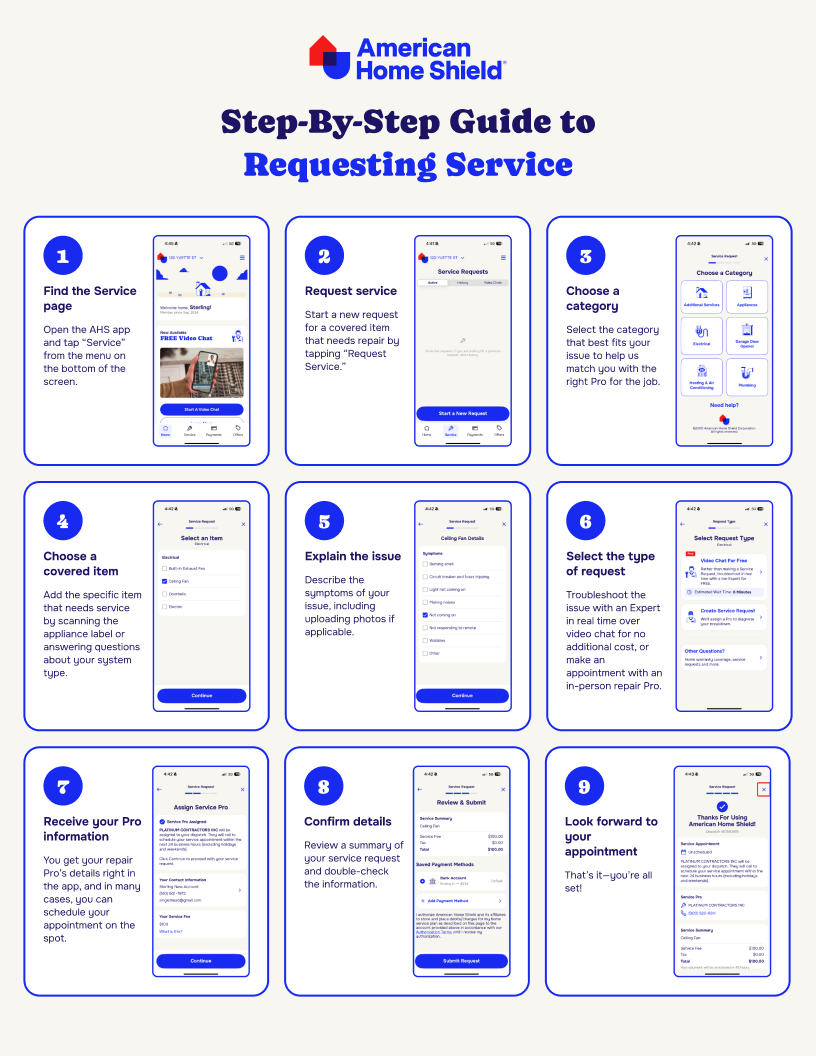
Open the AHS app and tap “Service” from the menu on the bottom of the screen. This is where you can see an overview of all your service requests, past and present. From here, you’ll start a new request for a covered item that needs repair by tapping “Request Service.”
2
Choose a category
Select the category that best fits your issue—whether it’s “Appliances,” “Plumbing,” “Heating & Air Conditioning,” “Electrical” or another covered system. This helps us match you with the right Pro for the job.
3
Select the item
Next, you will add the specific item that needs the service. If you are looking to fix your furnace, for example, the app will walk you through the types of heating systems that you may have. If you are servicing an appliance, you can scan the appliance label, or enter the type of appliance manually.
4
Add details and symptoms
Here’s where you describe what’s wrong. Is your AC blowing warm air? Is your dishwasher leaking? Adding clear details helps the contractor diagnose the issue faster. You can even upload photos if applicable to show what’s going on.
5
Get your Pro and schedule your appointment
Once you submit your request, AHS will assign a independent repair Pro to your repair. You’ll receive a message from a repair Pro within 48 hours to schedule an appointment.
6
Review and submit
Before finalizing your request, you’ll see a summary of your service request, including the covered item, issue details, and any applicable service fees. Double-check the info, then tap “Submit Request.” That’s it—you’re all set!
Your step-by-step guide to getting service
Check out our free guide for even more help using the American Home Shield app to request service.
Once your request is in, you can track every step of the process right in the American Home Shield app. Tap “Service” to see updates like:
When your Pro is assigned
Appointment details and confirmation
When parts are ordered (if needed)
Service completion status
No more wondering what’s happening with your repair—just open the app and get real-time updates, all in one place.
Tips for a smooth process
Your service request should go seamlessly, but here are a few tips to ensure your experience is as helpful and efficient as possible:
Use video call
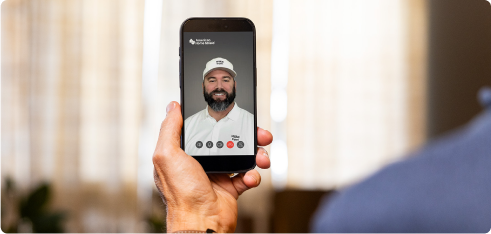
With as a benefit for select AHS plans, you can connect with a live repair Technician over video call at no additional cost before deciding to make an in-home service request. An Technician will help you assess or fix the issue in real time, giving you personalized answers and saving you an unnecessary service visit if a repair is not needed.
You don’t have to home alone.
Download the American Home Shield app now and start using video call for real-time solutions.
Before submitting a request, review your American Home Shield plan to make sure the item is covered. You can check your plan agreement by logging into MyAccount to view your plan agreements.
Be as detailed as possible
The more info you provide about the issue, the better. Describe what’s happening, upload photos if needed, and share any recent maintenance or repairs. This helps your Pro come prepared.
Schedule at a time that works for you
Once your Pro is assigned, you may be able to choose an appointment time that fits your schedule. Booking early can help you get the most convenient slot.
Stay updated in the app
Use the Service tab to track progress and get real-time updates about your repair. That way, there’s no confusion about the process. All the information you need is consistently updated, and right at your fingertips.
Don’t worry. Be warranty.
Sometimes, it’s hard to admit when something in your home isn’t working right. Maybe you convince yourself that one more rinse cycle will fix the dishwasher, or one thorough scrub of the lint trap will bring your dead dryer back to life. But with the AHS app, requesting service is easier than ever—so you can stop hoping and start solving.
AHS assumes no responsibility, and specifically disclaims all liability, for your use of any and all information contained herein.
Frequently Asked Questions
You can request service for any covered item under your American Home Shield home warranty plan, including major appliances, HVAC systems, plumbing, and electrical components. If you’re unsure whether an item is covered, you can check your contract details via MyAccount.
No, American Home Shield members cannot choose their own contractors. Rest assured that AHS works with a network of qualified, trusted Pros to handle your repairs. When you request service, we’ll assign a Pro who specializes in your repair needs and makes sure your home is in good hands.
If you need to reschedule or cancel, you can contact the Pro assigned to you directly.